Quickhand
An n8n concept that answers leads on four channels, scores them, and hands the best ones to a rep.
At a glance
Platform
n8n
Plan needed
Community (self-hosted), because the flow uses core nodes only
Trigger
A new SMS, WhatsApp, Messenger or Instagram message; hourly for follow-ups
Apps connected
8 (Twilio, WhatsApp Business Cloud, Meta’s messaging APIs, Google Sheets, Google Calendar, Slack, Postgres and an AI chat model)
AI steps
2 (qualify and reply, write follow-ups)
Human approval
Before a site visit is booked, by a rep, with a form in Slack
Runs
One run per message; follow-ups every hour
Status
Concept
The manual process
Every lead waits for someone to be free
A lead asks a solar installer about price while the team is on a roof. Someone has to notice the message, reply, ask about the budget and timeline, copy the details into a sheet, then find a rep. We built Quickhand around a fictional installer, Lantern Bay Solar, to show how AI lead qualification can take that first conversation.
Quickhand is a concept, an automation we designed for n8n and illustrated with a clickable prototype and dummy data, to show how we’d solve this.
Pain points
Enquiries arrive on a phone, in WhatsApp, and in the Facebook and Instagram inboxes, and each is answered by hand.
Replies are slowest while the team is on site or after hours.
Estimated at 10 minutes of back-and-forth per lead (assumes about 6 messages across a day).
The automation, step by step
From a first message to a booked visit
Step
n8n block
What happens
01
Trigger node
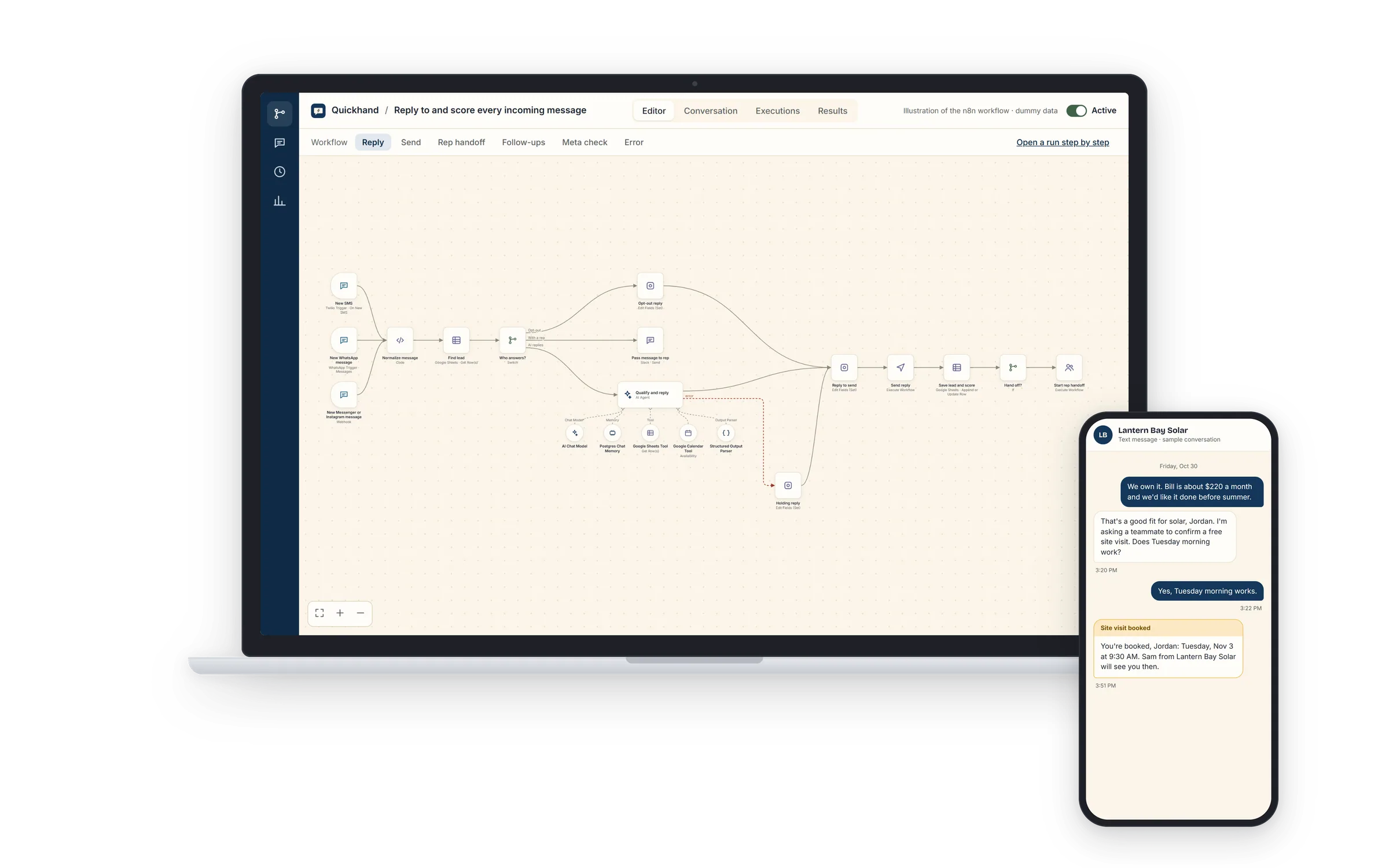
A new SMS (Twilio Trigger) or WhatsApp message (WhatsApp Trigger) arrives.
02
Webhook
A new Messenger or Instagram message arrives from Meta.
03
Code
Every channel’s message is converted to one format. Delivery receipts, echoes and repeats are dropped.
04
Google Sheets
The lead is looked up in the Leads sheet.
05
Switch
An opt-out word goes one way, a lead already with a rep another, and everyone else goes to the AI.
06
Edit Fields
An opt-out sets a short reply and the status Opted out.
07
Slack
A lead already with a rep has their message passed to that rep, and the AI stays silent.
08
AI Agent
The agent replies, asks one question at a time, and scores budget, timeline and behaviour from 0 to 100.
09
Edit Fields
If the agent fails after 3 tries, the lead gets a holding reply and is flagged for a rep.
10
Edit Fields
Every reply gets the same shape, and the handoff rule is applied.
11
Execute Workflow
The reply goes out on the lead’s own channel.
12
Google Sheets
The lead and score are saved.
13
If
A score of 70 or more, low confidence, or a request for a person starts the handoff.
14
Execute Workflow
The rep handoff starts, and the lead already has their reply.
15
Slack, Send and Wait for Response
A rep gets a short form with the details, and has 2 hours to answer.
16
Google Calendar
“Book the visit” creates the event, then the lead gets a confirmation and is marked Booked.
17
Google Sheets
“I’ll take over”, or no answer, marks the lead With rep, and the AI stops replying.
18
Schedule Trigger
Every hour, a separate workflow gets the leads in nurture.
19
Code
It keeps those due a follow-up, 23 hours, 3 days and 7 days after their last message.
20
Switch
It picks what each channel allows.
21
Basic LLM Chain
AI writes a short follow-up from what the lead already said, where free text is allowed.
22
WhatsApp Business Cloud
A WhatsApp lead outside the 24-hour window gets an approved template instead.
23
Slack
A summary of the follow-ups goes to the team, naming the leads a rep should contact.
The AI’s job and its guardrails
It starts the conversation, a person closes it
The agent gives price ranges, never a firm quote. It can see open site-visit slots, but only a rep can confirm one. The lead gets a reply first and the rep reviews afterwards, so the approval never slows the first response.
Follow-ups change by channel. WhatsApp and Messenger limit free-form messages to 24 hours after the lead’s last message, and we treat Instagram the same way. So a follow-up is AI-written on SMS or inside the window, an approved template on WhatsApp, and a rep’s job on Messenger and Instagram. STOP ends follow-ups on any channel.
It decides the reply, the next question, and a score out of 100 (budget 40, timeline 40, behaviour 20). Below 40, once the questions are answered, it closes politely.
A person approves every site visit. A rep books it or takes over from a form in Slack.
When it isn’t sure (confidence below 0.6), or when the lead asks for a person, it hands over to a rep. After that, the AI stays silent.
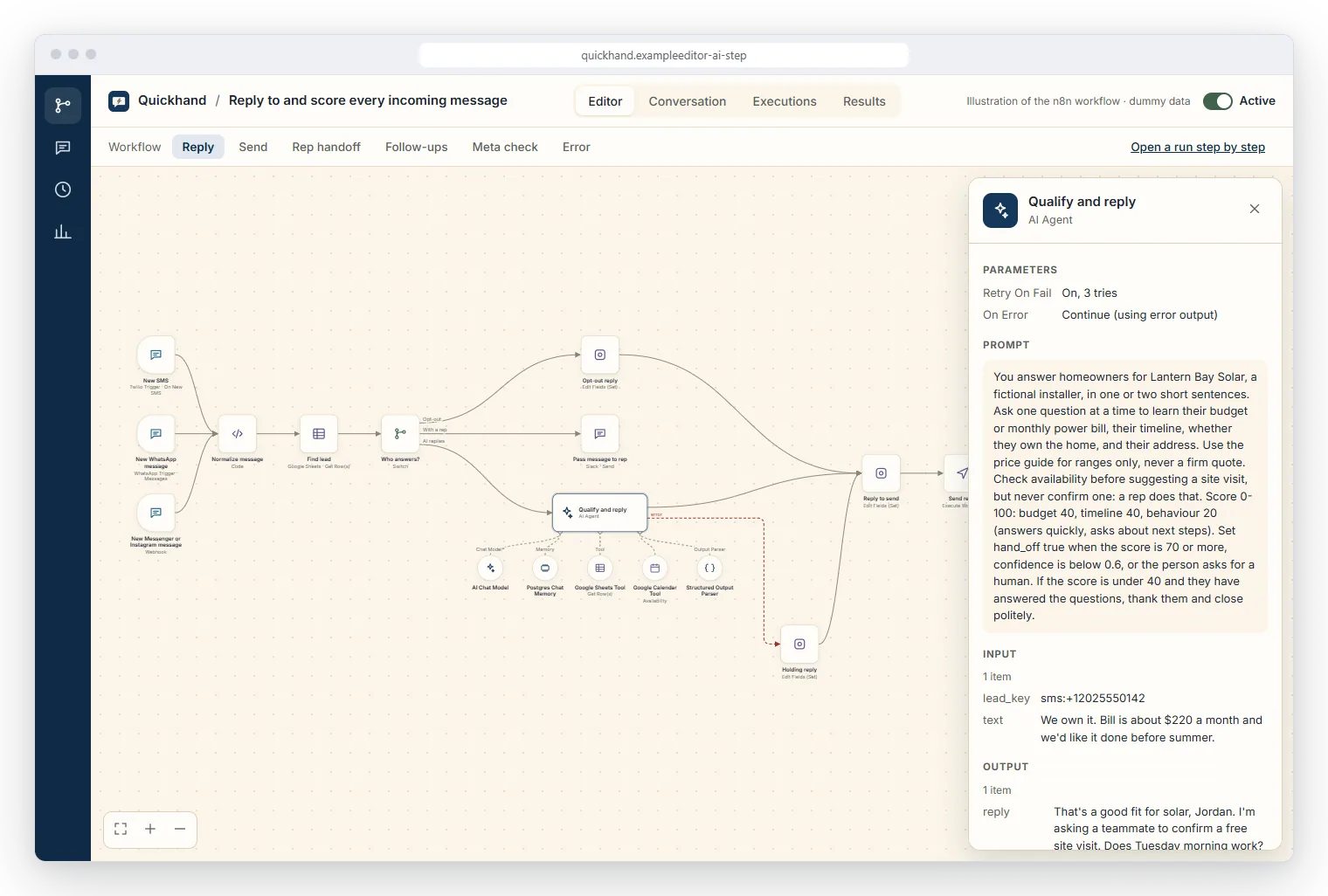
The Qualify and reply step’s prompt, input and scored output (an illustration with dummy data).
Reliability
Nobody is left without an answer
If the agent still fails after its retries, the lead gets “A teammate will text you shortly” and goes to a rep.
The agent, every send and the sheet and Slack steps in the reply workflow retry 3 times.
A separate error workflow alerts the sales lead in Slack when any workflow fails. n8n keeps a history of every run, so each one can be opened step by step.
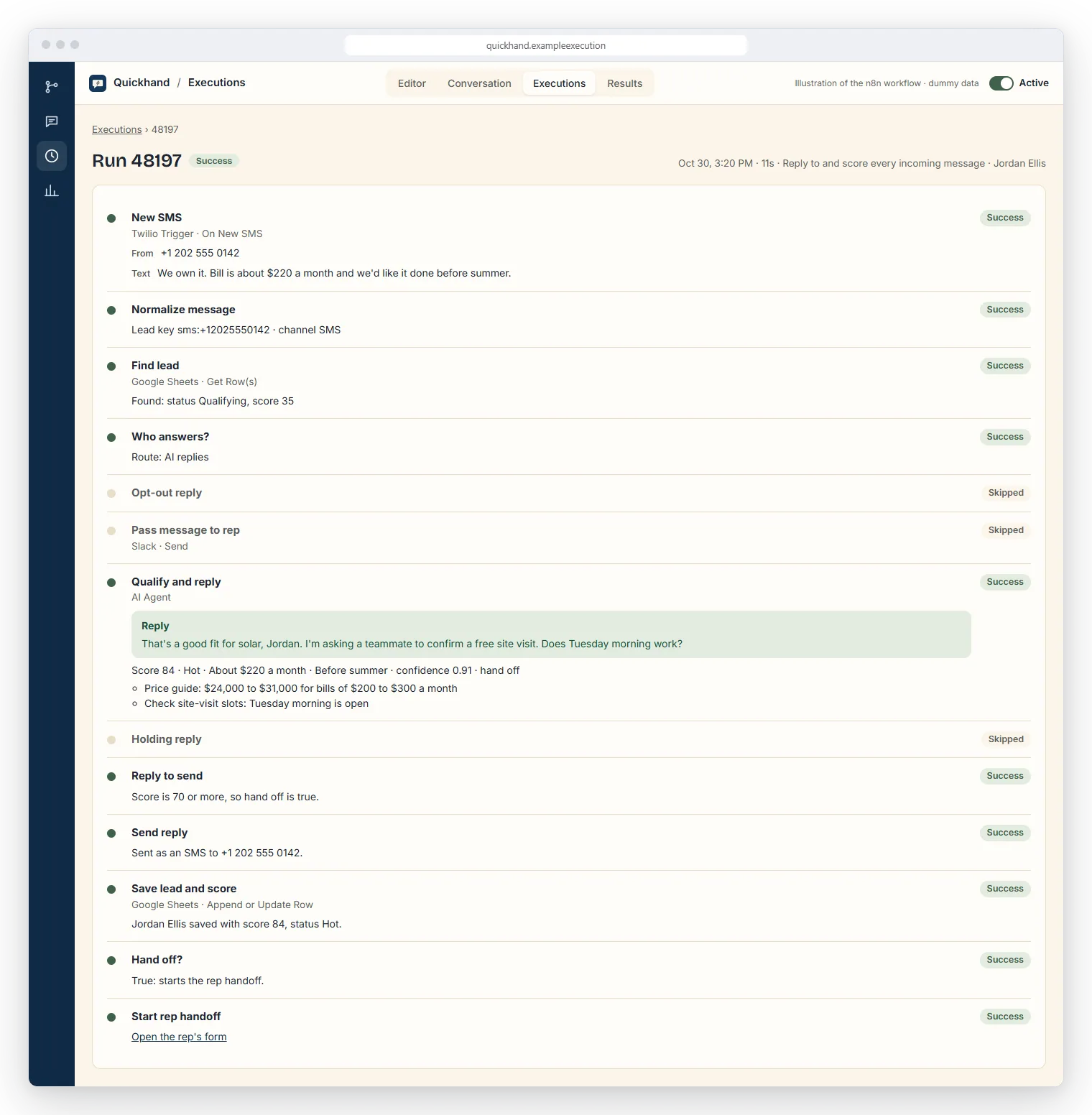
One lead’s message, step by step, from the SMS to the rep handoff (an illustration with dummy data).
Apps, accounts and cost
What it needs, and what drives the cost
n8n
Self-hosted n8n on your own server. The Community plan is enough, because the flow uses core nodes only (checked 2026-10-30). Self-hosted n8n doesn’t bill per execution.
Messaging
A Twilio account for SMS, a WhatsApp Business account, and a Meta app for Messenger and Instagram.
Google and Slack
Google Sheets for the leads and the price guide, Google Calendar for site visits, and Slack for the rep’s form and the alerts.
Memory
A Postgres database, so the agent remembers each lead’s conversation.
AI model
An API account with an AI model provider. It reads each lead’s messages and writes the replies.
What you pay for
The server, model usage per reply, SMS segments and WhatsApp template messages. Each reply makes one AI call and sends one message.
What the team sees
A conversation for the lead, a clean sheet for the team
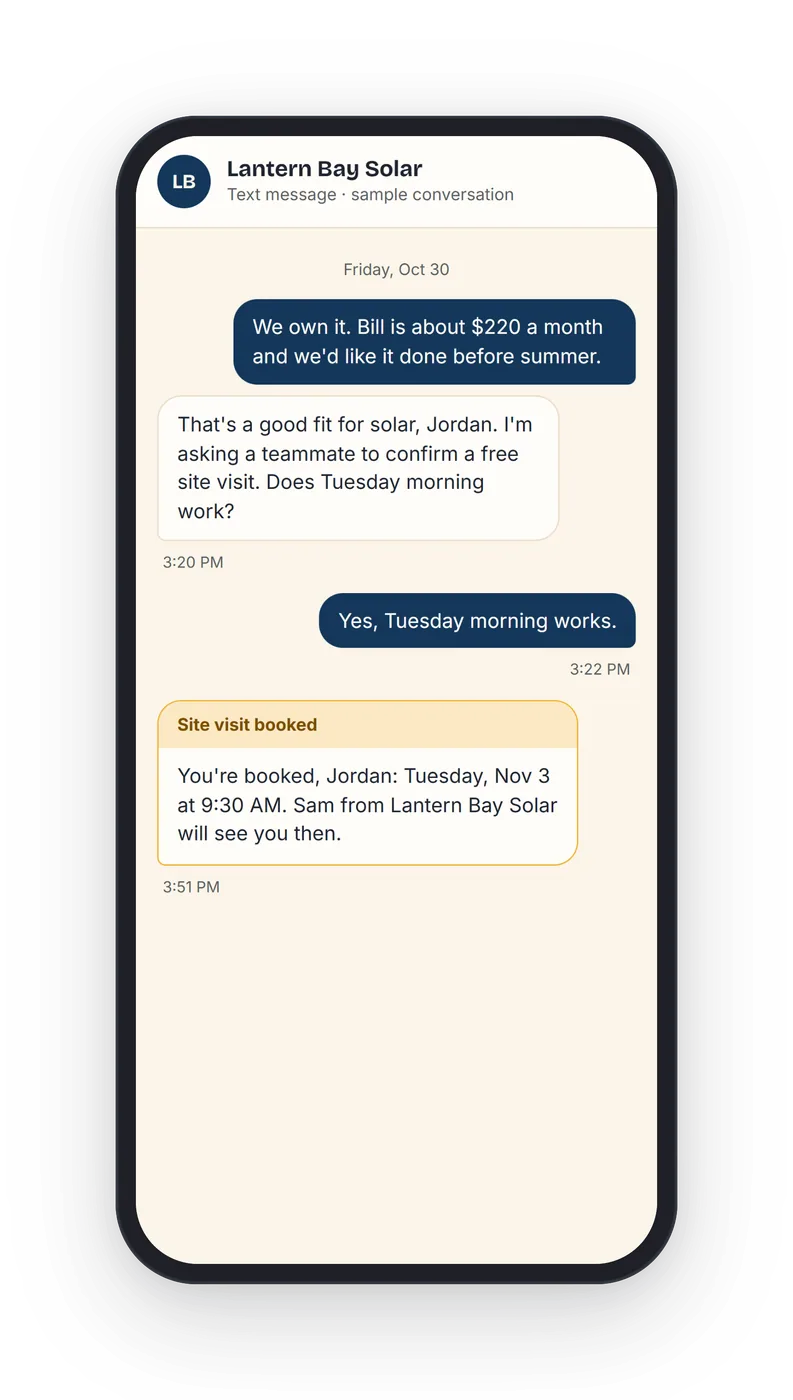
The booking confirmation on a phone (an illustration with dummy data).
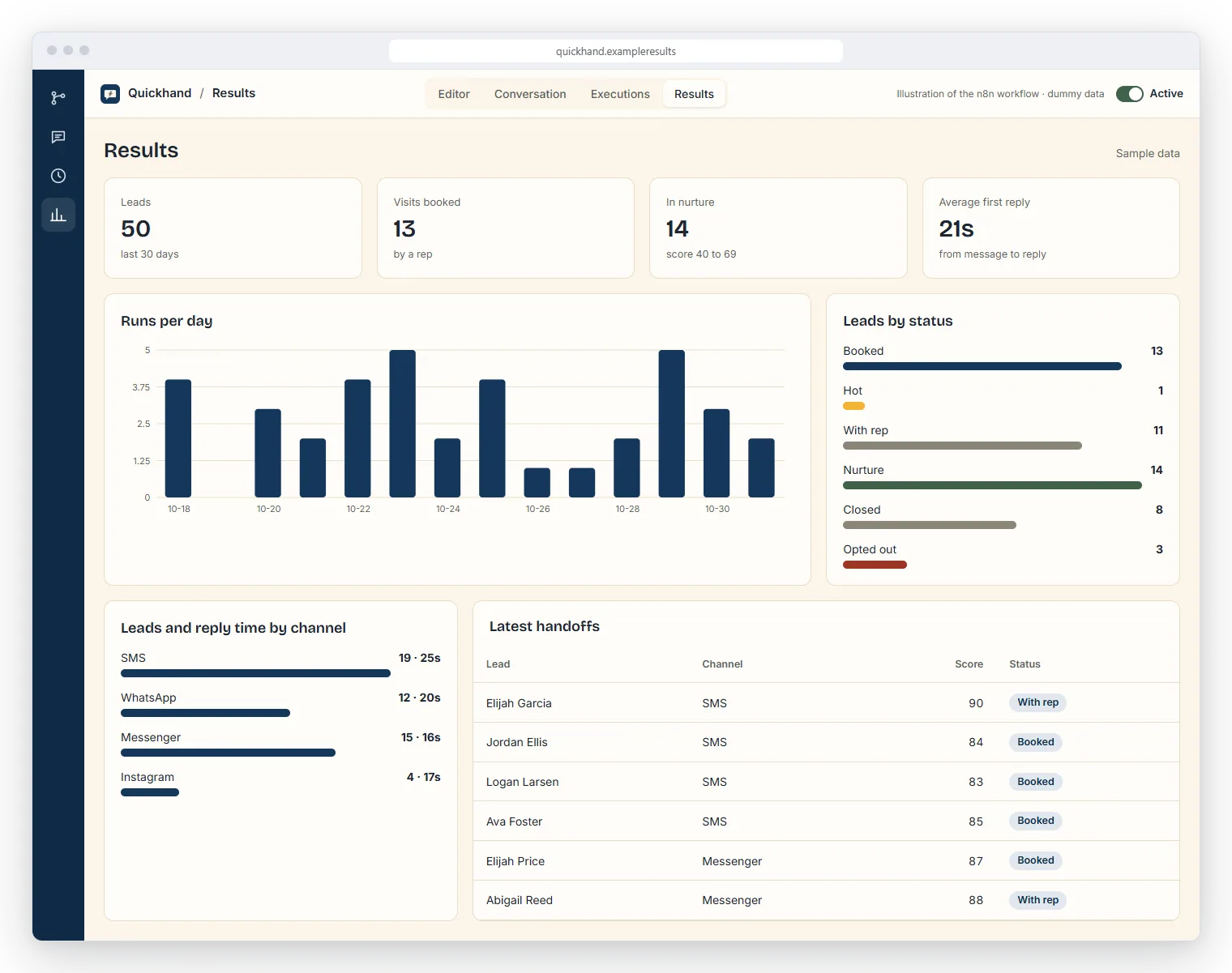
The results dashboard, with sample data.
Outcome
A concept, ready to adapt
Quickhand is a concept we can adapt and build for your channels, scoring rules and apps. It isn’t limited to solar. Any business that sells on a first conversation can use the same structure.
An estimated 1,200 runs a month (assumes 200 leads at 6 messages each).
Request a demo
See it on a call
We’ll walk you through the clickable prototype on a call and answer your questions.