Framewright
An n8n concept that tags and sorts a listing shoot, finds missing shots, stages chosen empty rooms and holds it all for the agent’s approval.
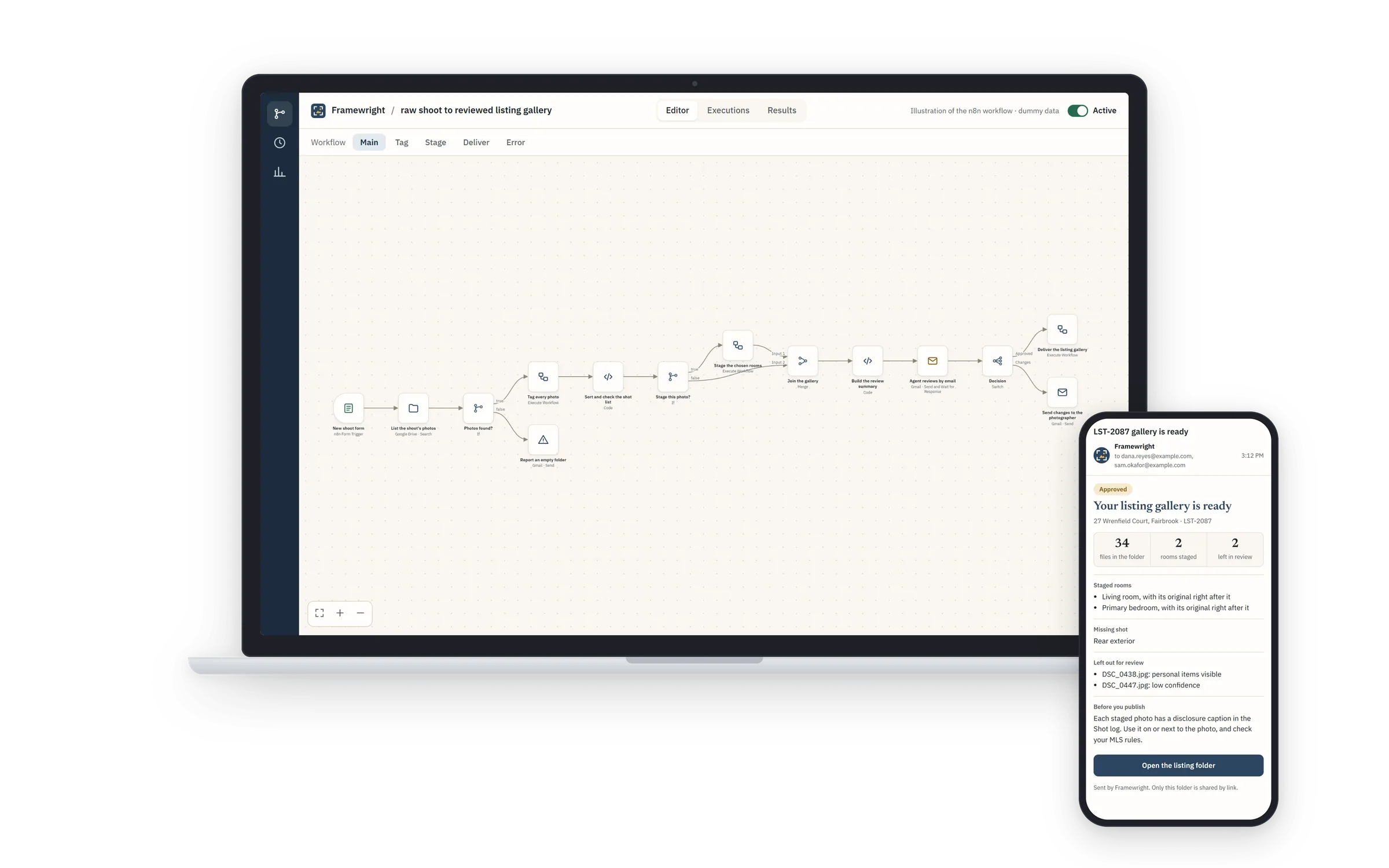
At a glance
Platform
n8n
Plan needed
Community (self-hosted), because the flow uses core nodes only
Trigger
A coordinator submits a new shoot form
Apps connected
4 (Google Drive, Google Sheets, Gmail and OpenAI)
AI steps
2 (tag each photo, stage each chosen room)
Human approval
Before anything is copied or shared, by the listing agent, by email and a short form
Runs
Instant, one run per shoot
Status
Concept
The manual process
Every shoot starts with an hour of sorting
After a shoot, someone opens every photo, renames it, puts the set in order, checks that the listing has the shots it needs, and briefs staging for the empty rooms. We kept the Drive folder media teams already use as the starting point, because real estate photo automation should fit the way a shoot already arrives.
Framewright is a concept, an automation we designed for n8n and illustrated with a clickable prototype and dummy data, to show how we’d solve this.
Pain points
Every photo is opened, renamed and ordered by hand.
A missing shot often shows up only when someone checks the set against the list.
Estimated at 60 minutes per shoot (assumes one coordinator sorting 35 photos and briefing staging for 2 to 3 rooms).
The automation, step by step
From a raw shoot to a shared gallery
Step
n8n block
What happens
01
n8n Form Trigger
The coordinator uploads the shoot to a Drive folder and submits a short form, ticking the rooms to stage.
02
Google Drive
The images in the folder are listed, skipping files already staged.
03
If
When the folder is empty, the photographer gets an email and the run ends.
04
Execute Workflow
AI tags each photo with its room, whether it’s empty, how confident it is, any personal items and any quality issues.
05
Code
The photos go in shot-list order, any missing required shots are listed, and low-confidence photos and photos with personal items go to review.
06
If
The best photo of each ticked, empty room goes to staging.
07
Execute Workflow
AI adds movable furniture only, and the staged photo is saved next to the original.
08
Merge
Staged and unstaged photos join back into one gallery.
09
Code
The review summary is built, with before and after links.
10
Gmail, Send and Wait for Response
The agent gets the summary by email, then approves or requests changes with a note.
11
Switch
If changes are requested, the photographer gets the note and nothing is copied or shared.
12
Execute Workflow
If approved, the delivery workflow starts.
13
Google Drive
The listing folder is created, and photos are copied with numbered names, each staged photo directly before its original.
14
Google Sheets
Every file and caption is logged to the Shot log.
15
Google Drive
The folder is shared with anyone who has the link.
16
Gmail
The agent and photographer get a “gallery ready” email.
The AI’s job and its guardrails
AI sorts and stages, the agent decides
AI does two jobs. It tags photos and it adds furniture. Anything uncertain goes to a person, and an unreadable reply never becomes a guess. Missing shots aren’t an AI call at all, because a code step works them out from a fixed list.
It decides each photo’s room, whether it’s empty, its confidence, any personal items and any quality issues. For a chosen room, it adds movable furniture, rugs, lamps and art.
A person approves the whole gallery, before anything is copied or shared. The agent compares each staged photo with its original, because nothing checks the room automatically.
When it isn’t sure (confidence under 0.75), it sends a photo to review. So do personal items, which also keep it out of staging and out of the shared folder.
Do you have to disclose virtual staging? In California, yes. Business and Professions Code section 10140.8 requires a reasonably conspicuous statement on or next to the image, plus a public link to the original. Framewright writes that caption and keeps each original beside its staged photo. Check your own state and MLS rules, because this isn’t legal advice.
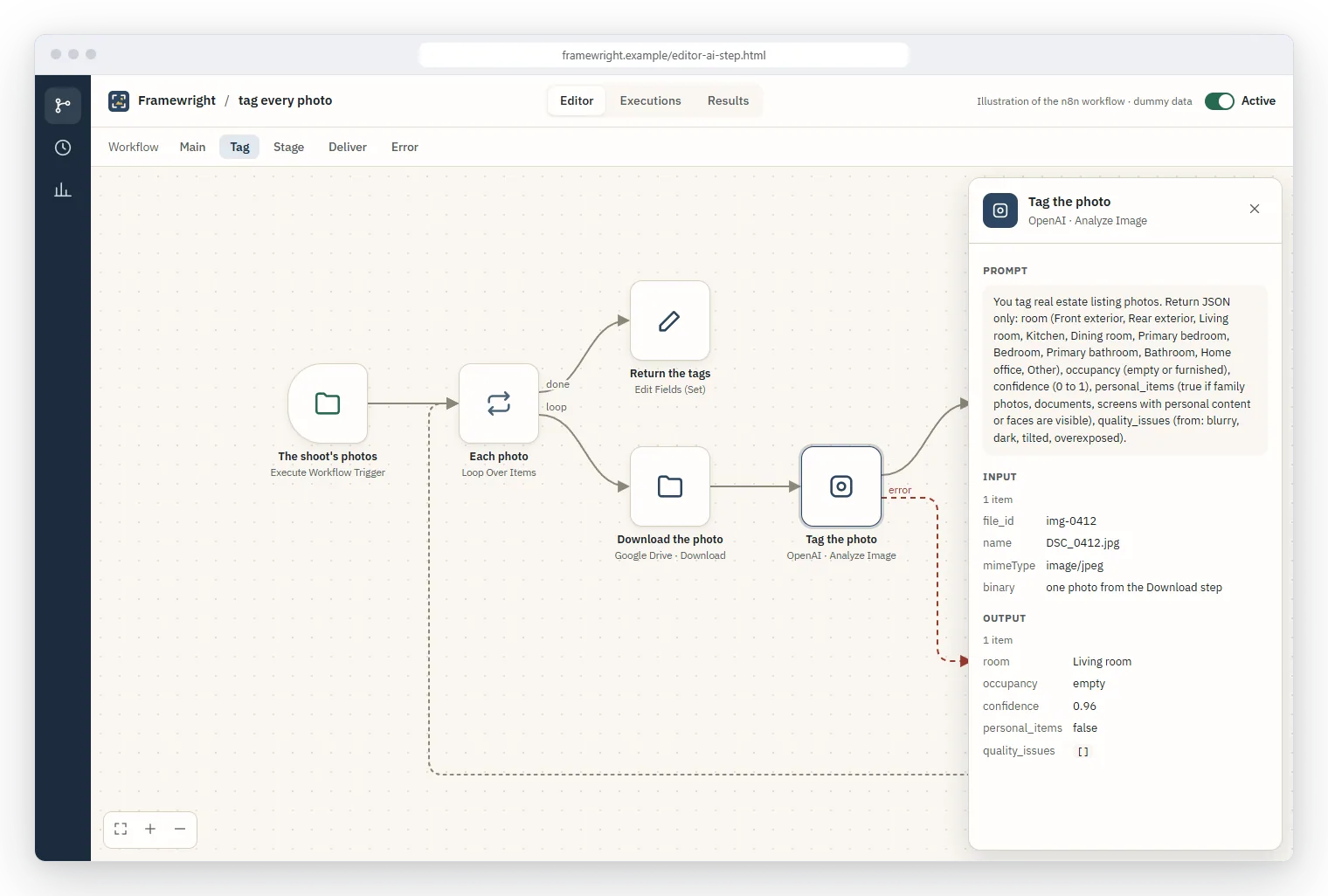
The Tag the photo step’s prompt, input and output (an illustration with dummy data).
Reliability
One bad photo doesn’t stop the shoot
A photo that can’t be tagged goes to review, and a room that can’t be staged keeps its original and is listed in the review email.
Every OpenAI, Drive, Sheets and Gmail step retries 3 times.
Any other failure runs an error workflow that logs it to a Run errors tab and emails the operations lead. n8n keeps a history of every run, so each shoot can be opened step by step.
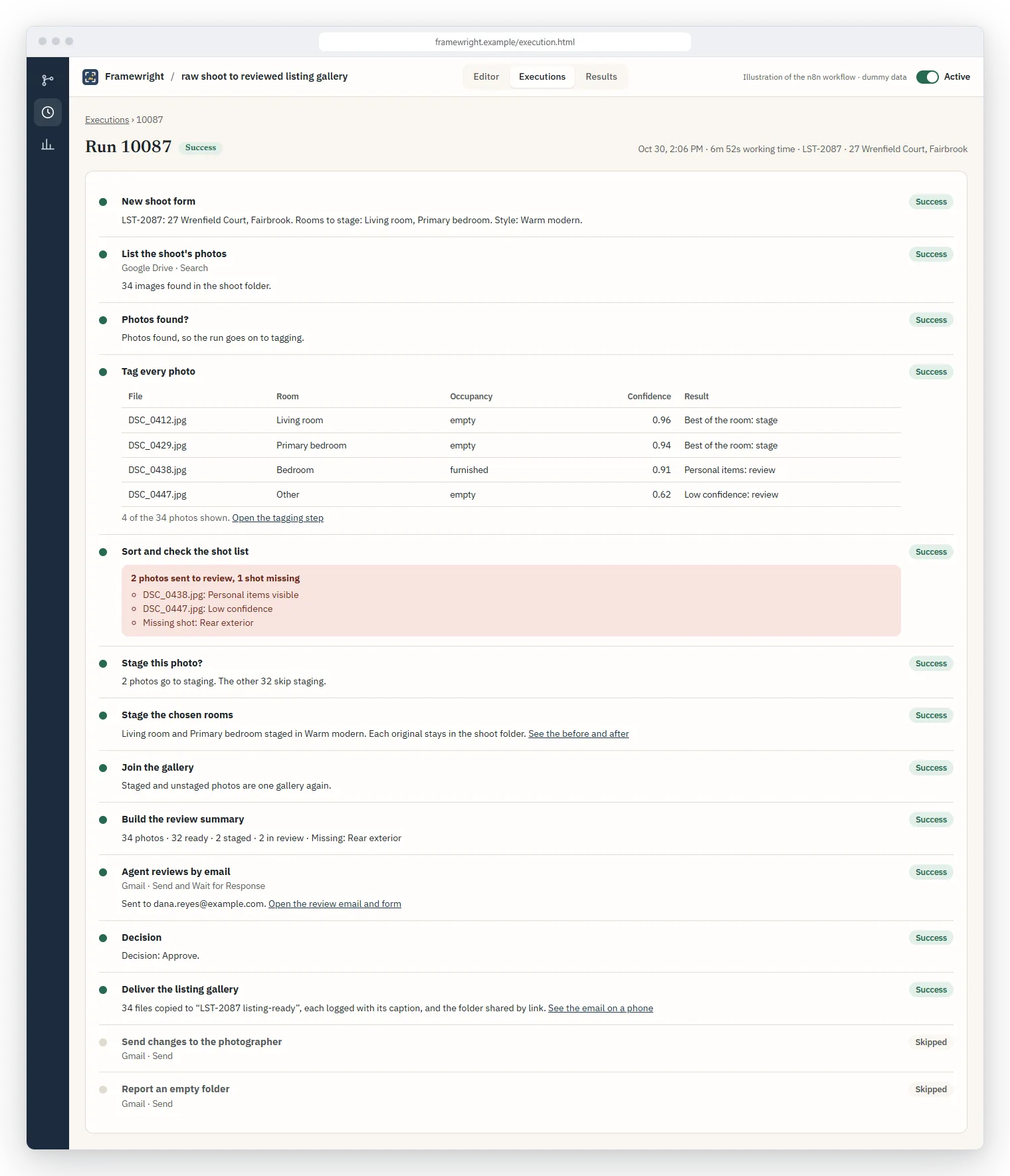
One shoot, step by step, including two photos sent to review (an illustration with dummy data).
Apps, accounts and cost
What it needs, and what drives the cost
n8n
Self-hosted n8n on your own server. The Community plan is enough, because the flow uses core nodes only (checked 2026-10-31). Self-hosted n8n doesn’t limit executions.
Google and OpenAI
A Google account for Drive, Sheets and Gmail, and an OpenAI API account.
What you pay for
The server and OpenAI usage. Each run makes one tagging call per photo and one image edit per staged room, so image edits and the size of the shoot drive the cost.
What the team sees
A review before sharing, a ready folder after
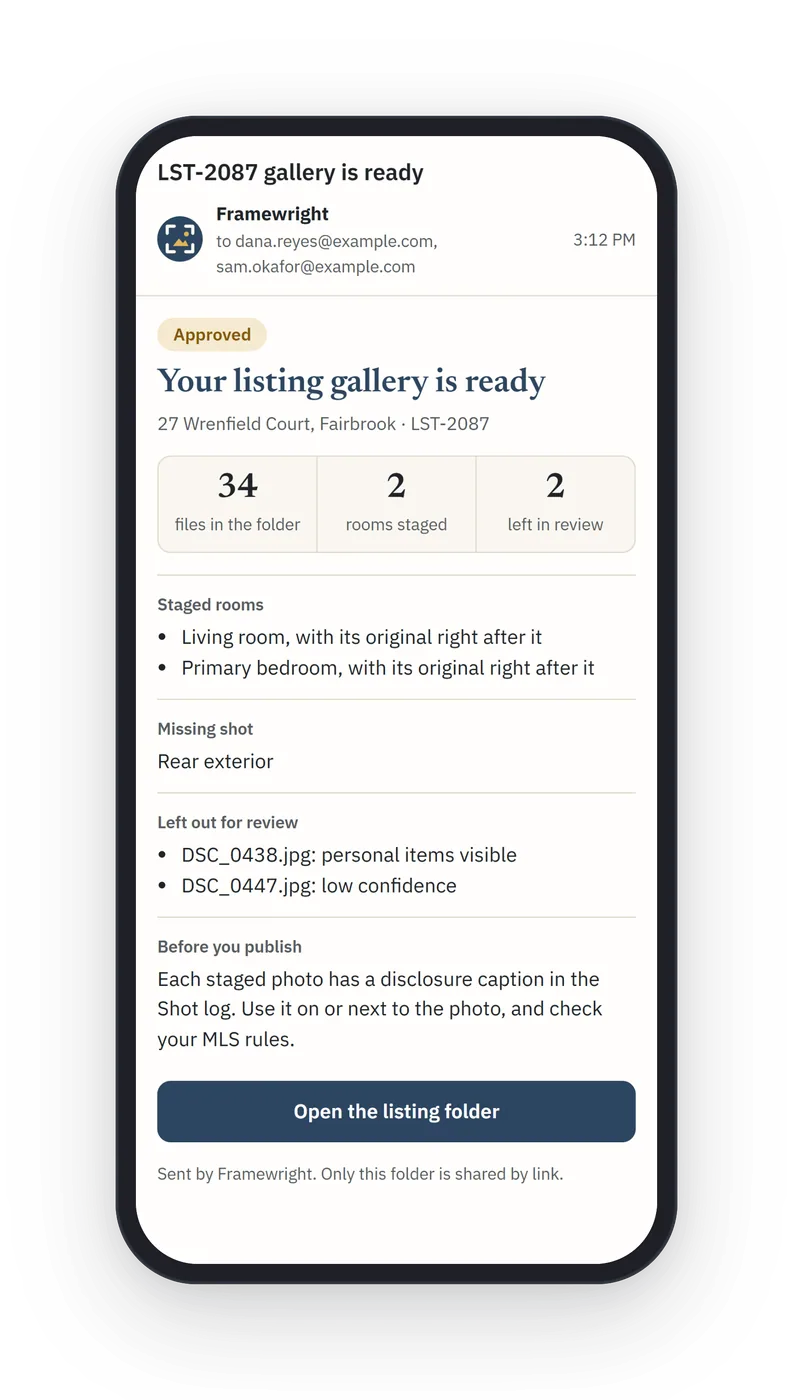
The gallery ready email on a phone (an illustration with dummy data).
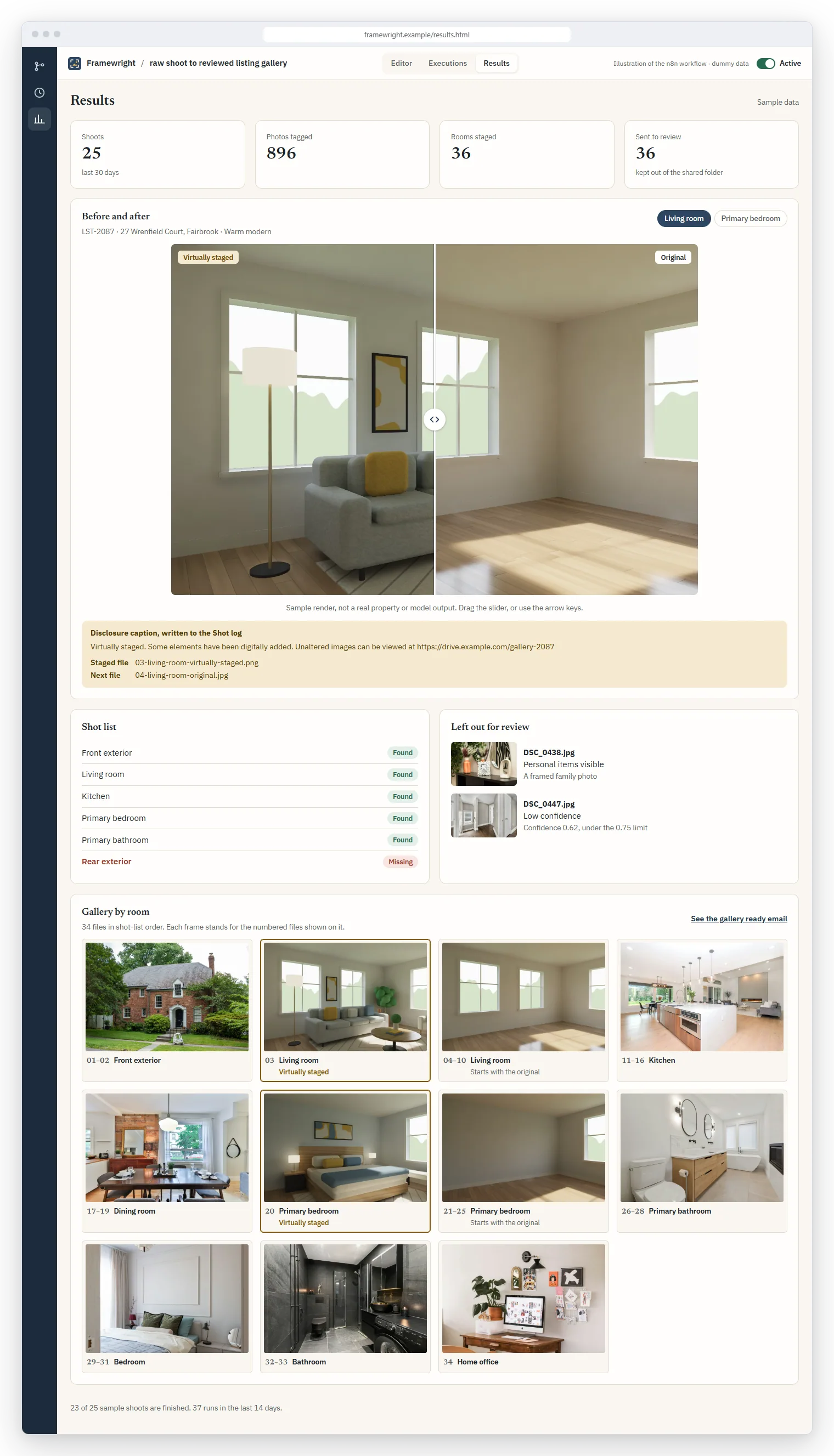
The results view, with sample data and sample renders.
Outcome
A concept, ready to adapt
Framewright is a concept we can adapt and build for your media team, with your shot list, your staging styles, your storage and your MLS rules.
An estimated 10 minutes of agent review per shoot (assumes no changes requested).
Request a demo
See it on a call
We’ll walk you through the clickable prototype on a call and answer your questions.